
Modelo 303: What It Is, Deadlines and How to File Your VAT Return


 19. November, 2026

Every quarter, Modelo 303 asks you the same thing: how much VAT (IVA) you've charged, how much you've paid and what difference is left. It sounds simple until you open the form from the AEAT (Spanish Tax Agency) and find dozens of boxes. This guide explains, in plain English, everything you need to file your quarterly VAT return yourself as a self-employed worker (autónomo) in Spain: what it is, who files it, the deadlines, how to read the result and the mistakes that trigger the most surcharges.
What Is Modelo 303 from the Spanish Tax Agency?
Modelo 303 is the VAT self-assessment return (autoliquidación) you file with the AEAT, usually every quarter. In it you declare the VAT on the invoices you've issued and subtract the VAT on your business expenses. The difference is what you pay to the Tax Agency (Hacienda) or what Hacienda owes you.
The key idea: VAT isn't yours. You charge it to your clients on behalf of Hacienda and hand it over every quarter. That's why Hacienda watches this form so closely: it cross-checks your figures with those of your clients and suppliers and, with VeriFactu, it will also have a record of every invoice you issue (mandatory from 1 January 2027 for companies and from 1 July 2027 for the self-employed).
Don't confuse it with other quarterly forms: Modelo 130 and Modelo 131 are instalment payments (pago fraccionado) of personal income tax (IRPF). Modelo 303 only settles VAT.
Output VAT vs. Input VAT: The Key to the Tax
The whole form revolves around output VAT (IVA repercutido) and input VAT (IVA soportado):
- Output VAT (IVA repercutido or devengado): the VAT you add to your invoices. If you invoice a taxable base of €1,000 at 21%, you charge €210 of VAT.
- Input VAT (IVA soportado or deducible): the VAT you pay on your business expenses, provided you have a full invoice and the expense is linked to your business.
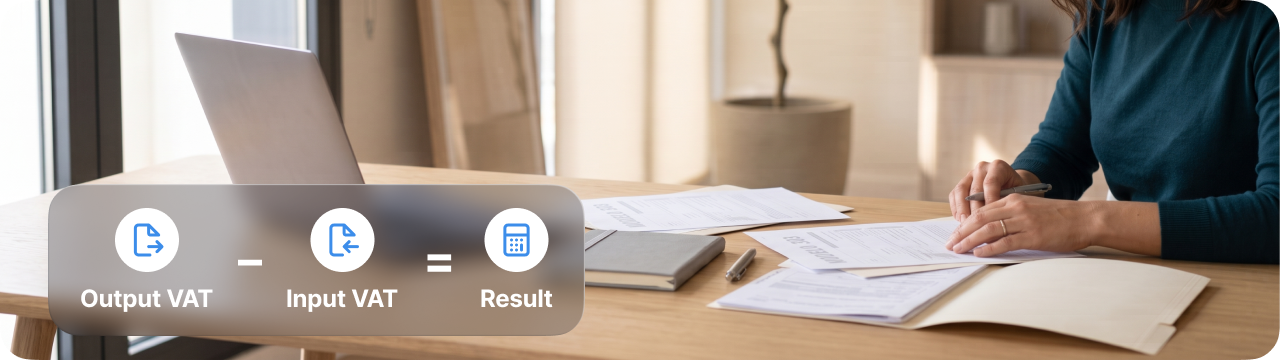
The formula is: output VAT − deductible input VAT = result for the quarter. Here's an example from a real quarter of a freelance designer:
| Item | Taxable base | VAT (21%) |
|---|---|---|
| Invoices issued | €3,000 | €630 output VAT |
| Business expenses (software, computer, coworking) | €800 | €168 input VAT |
| Result | €462 payable |
One detail that causes many mistakes: VAT is declared in the quarter in which you issue the invoice, even if you haven't been paid yet. The only exception is if you've opted into the special cash accounting scheme (criterio de caja).
Who Has to File Modelo 303?
Any business owner or professional carrying out transactions that are subject to VAT and not exempt must file it. It doesn't matter how much you invoice: if you're registered for an activity with VAT, you file every quarter, even if you've had no activity. In that case, the return is filed as "no activity" (sin actividad) if you haven't issued or received any invoices, or as "zero result" (resultado cero) if output VAT and deductible VAT cancel each other out exactly.
Self-Employed Workers and Companies
The following must file: self-employed individuals, limited companies and public limited companies (SL and SA), joint ownership entities (comunidades de bienes) and civil partnerships (sociedades civiles). So must anyone who rents out commercial premises or an office, because that rent carries VAT (residential rent is exempt).
Some special regimes change how you file the form:
- Cash accounting scheme (criterio de caja): you declare VAT when you get paid or pay, not when the invoice is issued.
- Simplified regime (módulos): the amount is calculated using the modules for your activity and has its own boxes within Modelo 303.
- Retail VAT regime (recargo de equivalencia): retailers under this regime generally don't file Modelo 303 for that activity; instead, the supplier adds the recargo to every invoice.
- Monthly refund register (REDEME): if you're registered, you file the form every month instead of every quarter.
If you've just registered, the introductory guide for the self-employed in Spain will help, with all your obligations to Hacienda and Social Security (Seguridad Social).
VAT-Exempt Activities (Doctors, Teachers, Writers)
Article 20 of the Spanish VAT Act (Ley del IVA) exempts certain activities. If your activity is only exempt, you don't file Modelo 303. The most common cases:
- Doctors and healthcare professionals: healthcare with a diagnostic or treatment purpose.
- Teachers: regulated education and private lessons you give personally.
- Writers and authors: the assignment of copyright on their works.
Watch out for the nuances. A doctor who performs cosmetic treatments without a therapeutic purpose does charge VAT, and so does a writer who is paid to moderate a corporate event. If you combine exempt and taxable activities, you file Modelo 303 for the taxable part and only deduct the VAT that corresponds to that part.
Tax Calendar and Modelo 303 Filing Deadlines
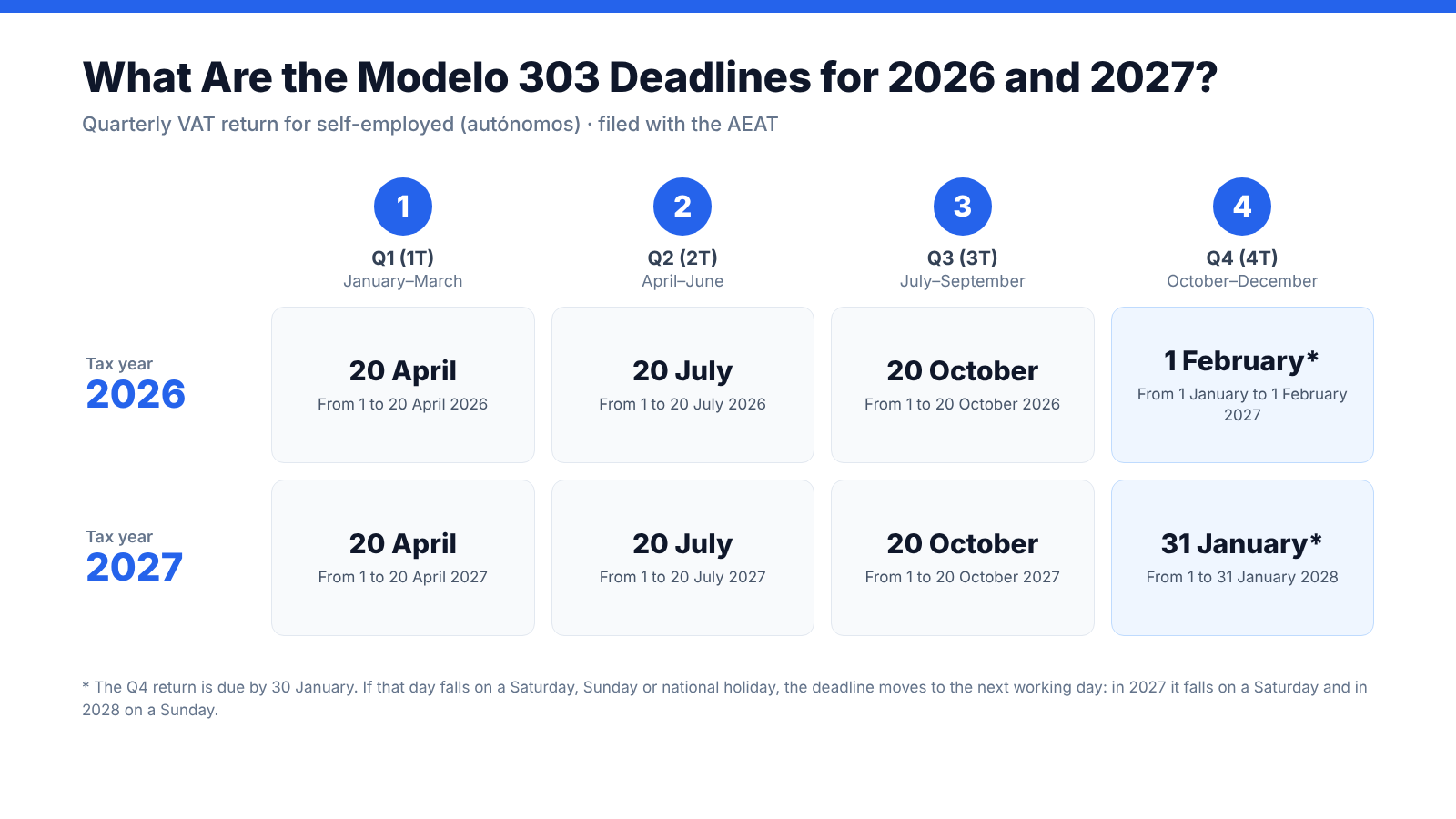
Modelo 303 deadlines are fixed and repeat every year: the first 20 days of the month following each quarter, except the fourth quarter, which is filed in January up to the 30th.
| Quarter | Months covered | Filing deadline |
|---|---|---|
| First quarter (Q1) | January, February and March | 1 to 20 April |
| Second quarter (Q2) | April, May and June | 1 to 20 July |
| Third quarter (Q3) | July, August and September | 1 to 20 October |
| Fourth quarter (Q4) | October, November and December | 1 to 30 January of the following year |
Additional points:
- If the last day of the deadline falls on a weekend or public holiday, it moves to the next working day. For example, in 2027, 30 January falls on a Saturday, so Q4 2026 can be filed until Monday 1 February 2027.
- File the form within the deadlines to avoid penalties and surcharges.
During the Q4 filing period you also file Modelo 390, the annual VAT summary, unless you're exempt from it. You'll find every date of the year in the 2026 tax calendar for the self-employed.
Direct Debit Dates (Days 1 to 15 of the Filing Month)
If you want Hacienda to collect the amount directly from your account by direct debit (domiciliación), you have to file the form earlier. For the first three quarters, direct debit is accepted from 1 to 15 April, July and October. For Q4, the direct debit window generally ends on 25 January; the AEAT confirms the exact date each year in its taxpayer calendar.
The charge is made on the last day of the filing period, so direct debit doesn't bring your payment forward. If you miss the direct debit date, you can still file until the end of the general deadline and pay with an NRC code from your bank or by card. If the result is to be carried forward or refunded, there's nothing to debit.
What Happens If You File Modelo 303 Late?
If you file late on your own initiative, before Hacienda asks you to, you pay a surcharge (recargo) of 1% plus an extra 1% for each full month of delay, with no penalty. After 12 months, the surcharge is 15% plus late-payment interest. If Hacienda detects the missing return first, it can open a penalty procedure, which costs considerably more.
Possible Results: Payable, Carry Forward or Refund
To understand the result, it helps to know where it comes from. Here are the Modelo 303 instructions in summary, block by block:
- Identification: tax year, quarter, NIF and name. You tick whether you're on the REDEME, in the simplified regime, under cash accounting or in insolvency proceedings (concurso de acreedores).
- VAT due (IVA devengado): in boxes 01 to 09 you enter the taxable bases and VAT amounts of your issued invoices for each rate (4%, 10% and 21%). Purchases from EU suppliers and reverse-charge transactions (inversión del sujeto pasivo) go in their own boxes. The total goes in box 27.
- Deductible VAT (IVA deducible): the VAT on your running expenses, on capital goods (for example, a computer) and on intra-EU purchases. The total goes in box 45.
- Result: box 46 is box 27 minus box 45. Then you apply any amounts still to be offset from previous quarters and get the final result in box 71.
Box 71 tells you which type of return you're filing:
| Result | When it happens | What you do |
|---|---|---|
| Payable (a ingresar) | You've charged more VAT than you can deduct. | You pay the amount within the deadline, by direct debit or with an NRC code. |
| Carry forward (a compensar) | You've deducted more VAT than you've charged, in Q1, Q2 or Q3. | The balance moves to the following quarters. You have four years to offset it. |
| Refund (a devolver) | The result is negative in Q4 (or in any month if you're on the REDEME). | You request the refund and give your bank account. Hacienda has six months to pay you; if it takes longer, it pays you interest. |
For a self-employed service provider, the usual outcome is an amount payable. A negative result tends to appear in quarters with a big investment or when you're just starting your activity.
Common Mistakes When Filing Your Quarterly VAT Return and How to Avoid Them
VAT self-assessment for the self-employed rarely goes wrong because of the calculation, but because of the data that goes into it. These are the mistakes that trigger the most notices from the tax agency:
- Deducting expenses without a full invoice. A standard receipt isn't enough. You need a full invoice, or a simplified invoice with your NIF and the VAT amount shown separately.
- Deducting expenses that aren't part of your business. A family dinner or your personal phone don't count. For a car with mixed use, Hacienda assumes 50% business use unless you prove otherwise.
- Declaring by payment date. If you're not under cash accounting, the invoice date is what counts, not the payment date.
- Applying the wrong VAT rate. Invoicing at 21% something that goes at 10%, or charging Spanish VAT to a business client in another EU country, which is taxed under the reverse charge and also goes in Modelo 349.
- Not filing quarters with no activity. The "no activity" return is also mandatory.
- Mismatches with Modelo 390. The sum of your four quarters must match the annual summary. Any difference can trigger a review.
Almost all these mistakes have the same source: copying figures by hand between invoices, spreadsheets and the form. With Conta, you issue your invoices with VeriFactu, scan your expense receipts and import your bank transactions (or connect your bank on the Pro plan). The invoicing software calculates the VAT on each transaction and prepares your Modelo 303, your Modelo 390 and their tax reports from that same data. You review the result and file it at the AEAT online office (Sede Electrónica), or give your accountant access to supervise it inside the software. If you want to check a specific case, the AEAT publishes the official 2026 Modelo 303 instructions (in Spanish).
Want to stop calculating VAT by hand? Conta's invoicing software automatically sorts your VAT rates (21%, 10%, 4%) to fill in your Modelo 303 in seconds, all in English.
Tax forms are included in the Basic plan, from €9/month + VAT, and the Pro plan, €19/month + VAT. During your 180 days free they're included, with no card required and no commitment.
Modelo 303 stops being scary once you understand the logic: the VAT on your invoices minus the VAT on your expenses, every quarter and on time. If your data is organised from the day you issue each invoice, closing the quarter is just a matter of reviewing and filing. You stay compliant with Hacienda without depending on anyone.